gren-format-lib
The Gren Formatter Library — Documentation
This is the full documentation for gilramir/gren-format-lib, the library
behind gren-format. The README covers only how to call the
library; everything else lives here — a formatted example, the formatting
philosophy, the comment rules, known limitations, performance, and the
comparison with elm-format — followed by links to every companion document
under Deep dive.
Table of contents
- The pipeline
- A formatted example
- Formatting Philosophy
- Comments
- Known limitations and Bugs
- Performance
- Comparison with elm-format
- Deep dive
The pipeline
Turning your source file into its formatted version happens through a pipeline of steps, each step handing its result to the next. Any step can fail: a parse error means the source itself is invalid Gren, while a failure in Step 1 or Step 2 means the formatter has caught an internal bug in its own logic — not that anything is wrong with your code. Either way, nothing is silently mangled; the failure is reported instead. This is the flow:
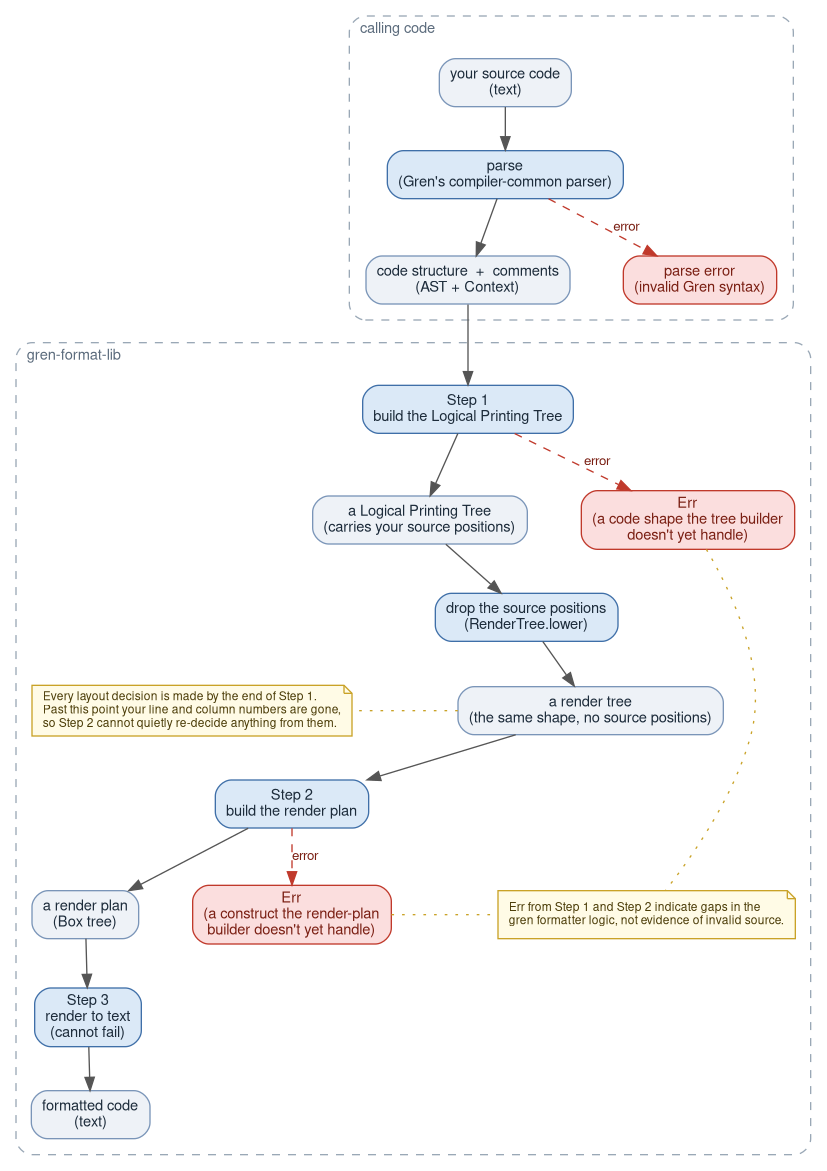
For the full step-by-step tour of that pipeline — what a Logical Printing Tree is, how a render plan is built from it, and a real example at each stage — see How the formatter works.
A formatted example
Here is one function, formatted, showing several rules at once.
{- Only members and coupon holders get the discount, and it always
   applies to the pre-tax subtotal.
-}
summarize : Order -> Array Float -> Order
summarize order prices =
    let
        subtotal =
            prices
                |> Array.keepIf (\price -> price > 0) -- refunds are recorded as negatives
                |> Array.foldl (+) 0

        eligible =
            order.isMember && subtotal > 100
                || order.hasCoupon && order.status /= Cancelled

        discount =
            if eligible then
                subtotal * {- ten percent -} 0.1

            else
                0
    in
    when order.status is
        Cancelled ->
            { order | total = 0 }

        _ ->
            { order
                | total = subtotal - discount
                , hasCoupon = False
            }
A few things worth noticing:
subtotalis a pipeline: each|>step lands on its own line, indented +4 fromprices(see Pipelines).eligibleis a binop chain the author wrote across two rows.||is the loosest operator here, so it’s the only one that breaks;&&and/=bind tighter and stay glued to their operands (see Binary operators).discount’sifbranches always drop to their own line, whether or not they’d fit inline (see If expressions).- Both
whenbranches return a record update,{ order | ... }— theCancelledbranch’s field was written on one line and stays inline, while the other branch’s two fields were written across rows and stay that way. Neither is about length; it’s however the author wrote it (see Record updates). - All three comments stay exactly where they were written.
- The
{- ... -}above the signature keeps its own lines and its inner indentation - the
--note stays trailing on the pipeline step it was written on, rather than being pushed to a line of its own - and the one-line
{- ten percent -}sits inside the expression, between the*and its right operand, so the line it’s on has to stay flat
- The
Every one of these decisions follows from how the code was written, not from any line-width target — see Formatting Philosophy below, and the full Formatter Rules for the complete reference.
Formatting Philosophy
This section covers the core ideas as to how gren-format formats the code; for a rule
reference with a before/after example for every construct (module
declarations, records, pipelines, comments, and everything else), see
Formatter Rules.
The Gren formatter has one central idea: your line breaks are your layout decisions. Write something on one line and it stays on one line. Put a line break between items and the formatter keeps them on separate lines, normalizing to one item per line.
There is no page width. The formatter never wraps a long line. A function call with five arguments all on one row stays on one line no matter how wide it is. A type signature written as one long line stays that way. If you want something to break, put a line break in it.
The four core rules:
-
One row → one line. If you wrote a construct on a single row, the formatter keeps it on one line. Width is irrelevant.
-
Multiple rows → one item per line. If you put a line break between any two items of a container — an array, a record, a call’s arguments, a pipeline’s steps — the formatter keeps every item on its own line. There is no “some items here, some there” shape: a line break anywhere in the container means every item gets its own line.
An operator chain is the one construct that breaks differently, because its items are not peers. A chain you wrote across rows breaks at its loosest operators and keeps the tighter ones glued to their operands, so the shape shows you the grouping (see Binary operators):
-- you write: -- gren-format writes: chain = chain = aa && bb aa && bb || cc && dd || cc && dd -- and if you break it at the tighter operator instead, -- the whole chain comes back flat: chain = chain = aa aa && bb || cc && dd && bb || cc && dd -
The formatter never changes what your code means. It never rewrites an expression — every paren you wrote is kept, redundant or not — and never edits the text inside a comment or string. It reorders exactly two things, neither of which is code: the names in an
exposing ( … )list, and a run ofimportstatements (see Sorting). -
Formatting is stable. Running the formatter on already-formatted code produces the same code back. Format once or ten times — same result, and nothing in the test corpus shifts. There is one corner case wher we cannot produce proper formatting: an upstream parser bug (compiler-common#35) reads
10 -⏎····3as the call10 (-3), so a--written after that-comes back as---. The formatter’s own AST check catches that and refuses to write the file rather than corrupt it. Those cases are registered by name so our automated testing allows that pass, until the bug is fixed. See Known Limitations.
A few things are always fixed, regardless of how you wrote them:
- A binding’s value always starts on its own line (see Function body).
- A
whenbranch body always starts on its own line. - An
ifbranch body always starts on its own line. - A blank line always separates
else/else iffrom the branch above it. - Two blank lines always precede every top-level declaration.
- One blank line always separates
letbindings. - A type alias always puts the aliased type on its own line.
- A custom type always puts the variant list on its own line(s).
- Indentation is 4 spaces. Always spaces, never tabs.
- On a
moduleline,exposingalways stays glued to the module name — never on its own line — though the exposed list itself can still spread across multiple rows below it (see Module declaration).
Everything else follows your layout choices.
Comments
gren-format never changes the text of a comment — it only decides where the
comment sits relative to the code around it. Seven rules decide every comment in
a file:
- C1 — A comment belongs to the code you wrote it next to.
- C2 — Where the parser doesn’t record the punctuation, the comment lands after it, not before.
- C3 — A comment never forces a break.
- C4 — A comment changes where the lines fall, and nothing else.
- C5 — gren-format adds nothing around a comment.
- C6 — A line-leading comment is indented to the code it leads.
- C7 — Comments written together stay together; comments written apart stay apart.
The first two settle which piece of code a comment is attached to; the last
five settle how the attached comment is laid out. Much of the rest follows
from one mechanical fact: a -- runs to the end of its line and a multi-line
{- … -} spans lines, so neither can share a line with the code around it,
while a one-line {- -} can — see
The two kinds of comment.
Each rule, with a “you write / gren-format writes” example for every case, is in How gren-format places your comments.
Known limitations and Bugs
gren-format has a handful of known gaps:
- a few inherited compiler/parser bugs
- a
whenpattern shape the Haskell-based compiler can reject - a bracketed pattern broken across rows that the Haskell-base compiler rejects
- several comment-placement choices forced by a token (
=,:,|,in, a bracket’s closing paren, an effect module’swhereblock) that the parser doesn’t record a position for - and a stack-depth limit on extreme lambda/unary-minus nesting (hundreds of levels deep, well past anything real code hits).
For a full write-up, with examples, see: Known Limitations.
Furthermore, here is a list of the GitHub issues we are tracking in upstream
packages that affect the output of gren-format.
- compiler-common#11 - Gren parser is more strict with indentation in when..is expressions
- compiler-common#14 - New parser rejects same-column arguments in multi-line function calls
- compiler-common#25 - The wrong row number is assigned to “import”, “type”, “type alias”, and “port” in the AST
- compiler-common#27 - Parser misparses postfix record access after parens, record literals, record updates, and qualified variables
- compiler-common#31 - new parser fails to parse a constructor-application pattern aliased with “as”
- compiler-common#32 - Parser accepts custom-type variants with more than one bare-constructor argument
- compiler-common#34 - Expand the recording of the original string for some literals
- compiler-common#35 - A binops minus sign (“-“) split across rows is parsed as negation when the right operand happens to start at the column immediately after the minus sign
- compiler-common#37 - A top-level declaration is accepted at any column; the Haskell-based compiler requires column 1
- core#134 - String.toInt returns the wrong value for 24 exactly-representable integers near 2^53
Performance
Real Gren files are small enough that formatting speed is a non-issue, but
the formatter is also checked against synthetic files pushed far past
anything realistic — thousands of top-level declarations, thousands of
stacked comments, deeply nested expressions — to catch algorithmic hot spots.
That stress suite is tests/pathological-other.py (size/shape probes) and
tests/pathological-nesting.py (depth probes), both described in
Testing gates.
A few representative numbers:
| Shape | Size | Time |
|---|---|---|
| Top-level function declarations | 15,131 | ~4s |
| Top-level function declarations | 40,000 | ~20s |
| Stacked top-level comments (no code — a stress case, not realistic) | 4,005 | ~0.5s |
| Stacked top-level comments (no code — a stress case, not realistic) | 32,000 | ~21s |
How it grows. Declarations are close to linear: each doubling of the file costs about 1.9–2.4× the time. The comments-only shape is the steepest thing measured here, at roughly 2.9–3.4× per doubling — still nowhere near a hang at sizes an order of magnitude past real source, but the one curve worth watching if comment handling changes.
The pattern behind those numbers is worth knowing if you work on the formatter,
because the same mistake is easy to make twice. Every performance problem this
codebase has had was one of two shapes: rescanning settled work — rebuilding
or re-walking the entire array of already-processed declarations or comments
once per new one, which is O(n²) in the file — or rendering the same subtree
twice, which is exponential in nesting depth. The fixes are equally uniform:
accumulate with Array.Builder (amortized O(1) per append) rather than
Array.pushLast/++ in a loop, and render each subtree once, up front, letting
every path consume the same result.
Comparison with elm-format
gren-format is a spiritual descendent of elm-format, and agree on
formatted syntax in most places. Both
formatters share the same “your line breaks are your layout decisions”
philosophy — neither reflows code to fit a page width — so they agree almost
everywhere. Where they don’t, it’s a catalogued choice: 32 divergences,
covering things like blank-line placement around comments, redundant parens
(the most common difference on real code), and how a multi-line operator chain
breaks. One of them isn’t a choice at all — Gren’s parser throws away the
position of =, ,, |, -> and the keywords, so a comment written beside
one of those has to snap to a canonical side
(#22).
The full catalogue, with a real before/after example for every entry, is in Comparison with elm-format.
Deep dive
Everything above is the short version. The full documents are in this same
docs/ directory, in two groups: the first is for reading about what
gren-format does to your code, the second for changing how it does it.
Using the formatter
- Gren Formatter Rules — the full rule reference, with a before/after example for every construct.
- How gren-format places your comments — why comments are the hard part, and the seven rules (C1–C7) that decide where every comment lands, each with a verified “you write / gren-format writes” example.
- Sorting — the two things the formatter reorders:
the names in an
exposing ( … )list, and a run ofimportstatements. - Settled formatting decisions — the closed questions: recorded Gren-team decisions the output must keep honouring, each with the fixture that pins it.
- Comparison with elm-format — every place
gren-formatdeliberately diverges fromelm-format, and why. - Known limitations — compiler/parser bugs and comment-placement choices the formatter can’t do better on today.
Working on the formatter
- How the formatter works — a conceptual, step-by-step tour of the pipeline (parse → Logical Printing Tree → render plan → text), with a real example at each step. Start here.
- Adding new Gren syntax to the formatter — the orientation guide for teaching the formatter about a new AST node, declaration kind, or expression form.
- The comment algorithm — the comment implementation itself: attachment, roles, the state machines, and why every run of comments is covered.
- Testing gates — every independent check, what failure class it aims at, and how to run it.
- What lowering to a RenderNode costs — the measurement behind the render barrier’s second tree, and why peak RSS is the wrong instrument to measure it with.
- Long fuzz sweeps — grinding through hundreds of
thousands of random modules with
fuzzrun.py, and across several hosts.
Working on some other formatter
- Challenges when writing gren-format — a short, informal tour of the problems we hit and what we did about each; the place to start.
- Putting the comments back — the long essay for people who are interested in writing formatters for other languages, or knowing how we did it for Gren.
llm/ is a third group, written to be read by a model rather
than a person: approaches already tried and backed out, the generator’s grammar
log, and a triage the divergence catalogue rests on. Nothing there is needed to
use or to change the formatter.